The short version: the estimate sets the price, the work order authorizes the work, and the invoice bills for what you did. On a quick service call you can skip the estimate. Don’t skip the other two. The signed work order is what you point to when the invoice gets questioned.
Free electrical work order and invoice PDF
One page, three parts, filled in top to bottom as the job goes. It works on a clipboard or on a tablet with a PDF app.
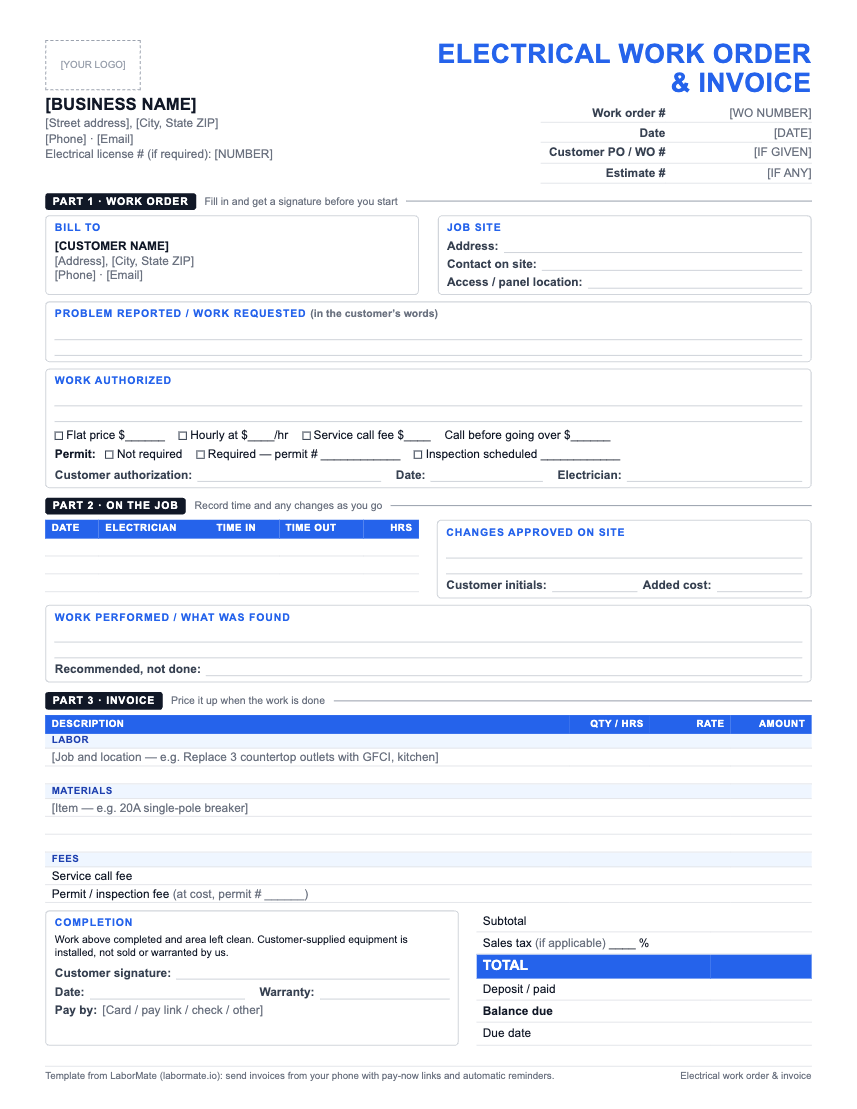
- Part 1, work order: job site, panel location, problem reported, work authorized, pricing, spending limit, permit and customer signature.
- Part 2, on the job: time in and out, changes approved on site, what you found and what you recommend.
- Part 3, invoice: labor, materials, service call and permit fees, tax, total, balance due and a completion signature.
Free · No signup · One US Letter page · Print it or fill it in on a tablet
Estimate, work order, invoice: the order they happen in
- •1. Estimate. The price you expect to charge, given before the job is booked. The customer approves it. For a panel upgrade or an EV charger it’s a must. For “my outlets stopped working” you usually can’t give one until you’ve looked.
- •2. Work order. Filled in when you arrive, or when the job is booked. It records the problem, the work the customer is authorizing, how it’s priced, a spending limit, and whether a permit is needed. The customer signs before you open a box or a panel.
- •3. The job. You log time and materials on the work order as you go. If the customer adds work, write it down and get their initials before you do it.
- •4. Invoice. When the work is done, price up what the work order recorded, add any permit fees, and send it with a due date and a way to pay.
Work order vs estimate vs invoice, side by side
| Question | Estimate | Work order | Invoice |
|---|---|---|---|
| When | Before the job is booked | Before work starts, kept open during the job | When the work is done |
| What it answers | “What will this cost?” | “What are you allowed to do, where, and on what terms?” | “What did you do, and what’s owed?” |
| Prices | Estimated total | How it’s priced and the spending limit, usually not a total | Final total |
| Customer signs? | Approves it | Authorizes the work, then signs off at the end | No. They pay it. |
| On a service call | Optional | Yes | Yes |
| On a panel upgrade | Yes | Yes | Yes, often in stages |
What goes on an electrical work order
- •Work order number and date. Use the same number on the invoice later. One number per job makes everything easy to match.
- •Customer and job site. Who’s paying, where the work is, who to talk to on site, and where the panel is.
- •The customer’s PO or work order number, if they gave you one. Property managers and businesses often won’t pay an invoice without it.
- •Problem reported, in the customer’s words. “Half the kitchen outlets stopped working.” It shows what you were called out for if the fix turns out to be somewhere else.
- •Work authorized. What they’re saying yes to, how it’s priced (flat, hourly, service call fee), and the amount you won’t go past without calling.
- •Permit. Needed or not, and the permit number if it is.
- •Customer signature, with the date and time.
- •Time log. Date, who worked, time in and out.
- •Changes approved on site, with the customer’s initials.
- •Work performed and what you found, plus anything you recommend but didn’t do.
- •Completion sign-off. The customer’s signature that the work is done.
Sample electrical work order
Here’s a work order for a common service call, filled in. Brackets are where your own details go.
Turning the work order into the invoice
When the customer signs off, everything you need for the invoice is already on the work order. Here it is priced up. The prices are made-up examples, not suggested rates.
| Description | Qty / hrs | Rate | Amount |
|---|---|---|---|
| Service call fee | 1 | $89.00 | $89.00 |
| Labor: trace dead kitchen outlets to failed GFCI left of sink, replace GFCI, test circuit. Added: replace dining room switch and plate (approved on site) | 1.75 hrs | $115.00 | $201.25 |
| 20A GFCI receptacle | 1 | $28.00 | $28.00 |
| Single-pole switch and wall plate | 1 | $9.00 | $9.00 |
| Total due | $327.25 | ||
- •Same number on both. Anyone looking at the invoice can pull up the signed work order.
- •The 1.75 hours come straight from the time log, and the labor line says what was found, not just what was done.
- •The switch was added on site, so the invoice says it was approved, and the initials on the work order back that up.
- •The recommendation moved to the notes. It’s useful to the customer and it’s the start of your next job.
- •Things the customer doesn’t need, like the panel location and time in and out, stay on the work order.
To build an invoice like this online, use the free electrician invoice template. It has labor, materials, service call and permit lines ready to tap in, and gives you a PDF.
Send the invoice before you pull out of the driveway
One combined form or separate documents?
A combined work order and invoice suits service calls: one visit, one sheet, signed at the start and the end. It’s quick, and nothing gets lost between the paperwork and the bill.
Bigger jobs are better with separate documents. A panel upgrade, a rewire or a basement finish needs a proper electrical estimate first, a work order per visit or phase, and invoices that follow a payment schedule. See progress billing for contractors for how to stage those invoices.
When a property manager or business sends you their work order, treat it as the authorization. Stay inside any not-to-exceed amount, get written approval before going over it, and put their work order or PO number on your invoice. Without it, your invoice can get stuck in their office.
Mistakes that hold up payment
- •Starting work before the customer signs the work order.
- •Doing extra work without writing it down and getting initials.
- •Leaving materials off the work order, then forgetting them on the invoice.
- •Missing the customer’s PO or work order number on the invoice.
- •Writing “electrical repair” instead of what you found and fixed.
- •Sending the invoice days later instead of at sign-off.
If an invoice is still unpaid, here’s when to follow up on an unpaid invoice, and for laying out long materials lists, see how to invoice for parts and labor.
Key Takeaways
It’s the document that says what electrical work you’re allowed to do, where and on what terms, signed by the customer before you start. During the job it’s where you record your time, materials and any changes. When the job is done, it becomes the basis for the invoice.
No. A work order authorizes the work and records what happened. An invoice is the bill. Many electricians use one combined form, so the work order section is filled in before the job and the invoice section after it, but they still do two different jobs.
A purchase order comes from the customer and approves them spending money with you. A work order describes the job itself, and it can come from you or from the customer. If a property manager or business gives you a PO or work order number, put it on your invoice so their office can match it and pay you.
A signature is the clearest proof they authorized the work and the price terms, and it settles most arguments before they start. For bigger home improvement jobs, some states require a signed written contract with specific terms, so a work order alone may not be enough. Check your state’s rules.
Yes, if it has everything an invoice needs: prices, a total, a due date and how to pay. That’s what the combined PDF on this page is for. For anything you email, a clean typed invoice with a pay link usually gets paid faster than a photo of a handwritten form.